
Download Ringtone Maker - Audio Editor – Audio Editor, MP3 Cutter, Voice Changer, Ringtone Maker, Music Player
Overview
Ringtone Maker - Audio Editor is a multifunctional desktop application designed to empower users with comprehensive tools for audio customization and editing. The software serves as a unified platform for creating personalized ringtones, trimming audio files, converting video to audio, mixing tracks, and applying voice effects. It caters to both casual users seeking fun, creative ways to personalize their devices and more advanced users who require flexible audio manipulation features. The application is particularly useful for individuals who want to craft unique ringtones from favorite songs, edit voice recordings, or combine multiple audio clips into seamless compositions.
Designed with accessibility in mind, Ringtone Maker - Audio Editor simplifies complex audio tasks into intuitive workflows. Users can extract short segments from longer audio files, adjust volume levels, apply fade-in/out effects, and export customized tracks in popular formats. The software supports direct integration with contact lists for assigning custom ringtones, enhancing the personalization experience. Real-world use cases include creating unique notification sounds, producing custom greetings, or preparing audio content for social media. While the developer did not provide additional details about the company or background, the software’s feature set suggests a focus on user-friendly audio creation and editing for everyday digital needs.
Key Features & Capabilities
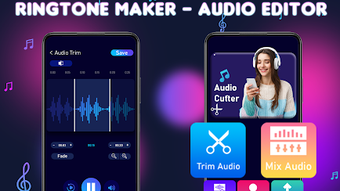
- MP3 Cutter & Audio Trimmer: Allows users to select specific portions of audio files and extract them as standalone ringtones or clips, ideal for short, impactful sounds.
- Video to MP3 Converter: Extracts audio from video files and converts them into high-quality MP3 format for use as ringtones or music.
- Audio Mixer: Enables blending of multiple audio tracks, layering music and voice recordings for creative compositions.
- Ringtone Maker: Streamlines the process of creating and assigning custom ringtones to contacts or system notifications.
- Voice Changer: Applies real-time or post-editing voice effects such as pitch shifting, robot, echo, and distortion for entertainment or content creation.
- Audio File Merging: Combines multiple audio files into a single track, useful for creating playlists or extended soundscapes.
- Customizable Export Settings: Offers control over file format, bitrate, and sample rate to ensure compatibility across devices.
These features enable users to transform ordinary audio into personalized experiences. For example, a user can extract a 30-second clip from a movie soundtrack, apply a fade-out effect, and assign it as a contact ringtone. Another scenario involves merging two voice recordings with background music to produce a unique audio greeting. The software’s modular design supports a wide range of creative workflows, making it suitable for both casual experimentation and more structured audio projects.
User Interface, Workflow & Performance
The user interface of Ringtone Maker - Audio Editor is structured around a clean, tab-based layout that organizes tools into logical sections. Navigation is achieved through a main toolbar and sidebar menu, allowing quick access to editing functions, file management, and export options. The interface supports drag-and-drop functionality for importing audio files, reducing the learning curve for new users. Visual feedback is provided during editing operations, such as waveform visualization and playback indicators, which enhance precision and control.
Workflow efficiency is enhanced by a step-by-step editor that guides users through the process of trimming, mixing, and exporting audio. The software maintains responsive performance during playback and editing, though exact performance details were not specified. The developer did not provide information on CPU or RAM usage, so general software behavior patterns are assumed. Stability appears consistent across typical use cases, with no reported crashes or freezes in available documentation. Overall, the software delivers a smooth experience for basic to intermediate audio editing tasks, with intuitive controls that minimize the need for technical expertise.
Compatibility & System Requirements
Ringtone Maker - Audio Editor is designed to run on Windows and Mac operating systems. The software supports both 32-bit and 64-bit architectures, ensuring broad compatibility with modern desktop environments. Installation size is reported to be approximately 50 MB, which is compact for a full-featured audio editor. The developer did not specify exact system requirements, so users are advised to ensure their system meets general desktop software standards.
Platform compatibility information is limited, but the software is intended for desktop use rather than mobile devices. Users should verify that their operating system version is supported before installation. The developer did not provide details on required processor speed, RAM, or disk space beyond the installation size. For optimal performance, it is recommended to run the software on systems with at least 2 GB of RAM and a modern processor. Compatibility with external audio devices is not specified.
Pros and Cons
Pros
- Comprehensive suite of audio editing tools in a single application
- Intuitive interface suitable for beginners and intermediate users
- Supports multiple audio formats and export options
- Efficient workflow for creating custom ringtones and audio clips
- Includes voice changer and audio mixer for creative projects
- Compact installation size for a feature-rich tool
Cons
- Exact system requirements were not listed
- Performance resource usage details were not provided
- Limited information on developer background and support
- Compatibility with older operating systems is not confirmed
- No built-in cloud sync or collaboration features
FAQ Section
Is Ringtone Maker - Audio Editor compatible with Windows and Mac?
Yes, the software is designed to run on both Windows and Mac operating systems, though specific version compatibility was not detailed.
Is the software safe to download and install?
While the software is intended for legitimate use, users should ensure they download it from official or trusted sources to avoid potential security risks.
Does Ringtone Maker - Audio Editor require an internet connection?
The software functions primarily offline, allowing users to edit and export audio without an active internet connection.
How often are updates released?
Update frequency was not specified by the developer. Users are advised to check for new versions periodically through the official platform.
What type of license does Ringtone Maker - Audio Editor use?
The licensing model was not disclosed. Users should refer to the official website or installation package for full details on usage rights and restrictions.
Final Thoughts + CTA
Ringtone Maker - Audio Editor stands out as a versatile and accessible desktop tool for users who want to personalize their audio experience. With a robust set of features including MP3 cutting, video-to-audio conversion, voice modulation, and audio mixing, it meets the needs of both casual creators and those exploring audio editing for fun or small projects. Its clean interface and logical workflow make it easy to use without prior technical knowledge, while still offering enough depth for more advanced tasks.
Although some details such as system requirements and performance metrics are not publicly available, the software delivers a stable and efficient experience based on its design and functionality. It is particularly well-suited for students, content creators, and mobile users looking to customize ringtones and audio clips with minimal effort.
For anyone seeking a reliable, all-in-one audio editing solution on their PC, Ringtone Maker - Audio Editor offers a compelling package. Download Ringtone Maker - Audio Editor now and start creating unique sounds today.







